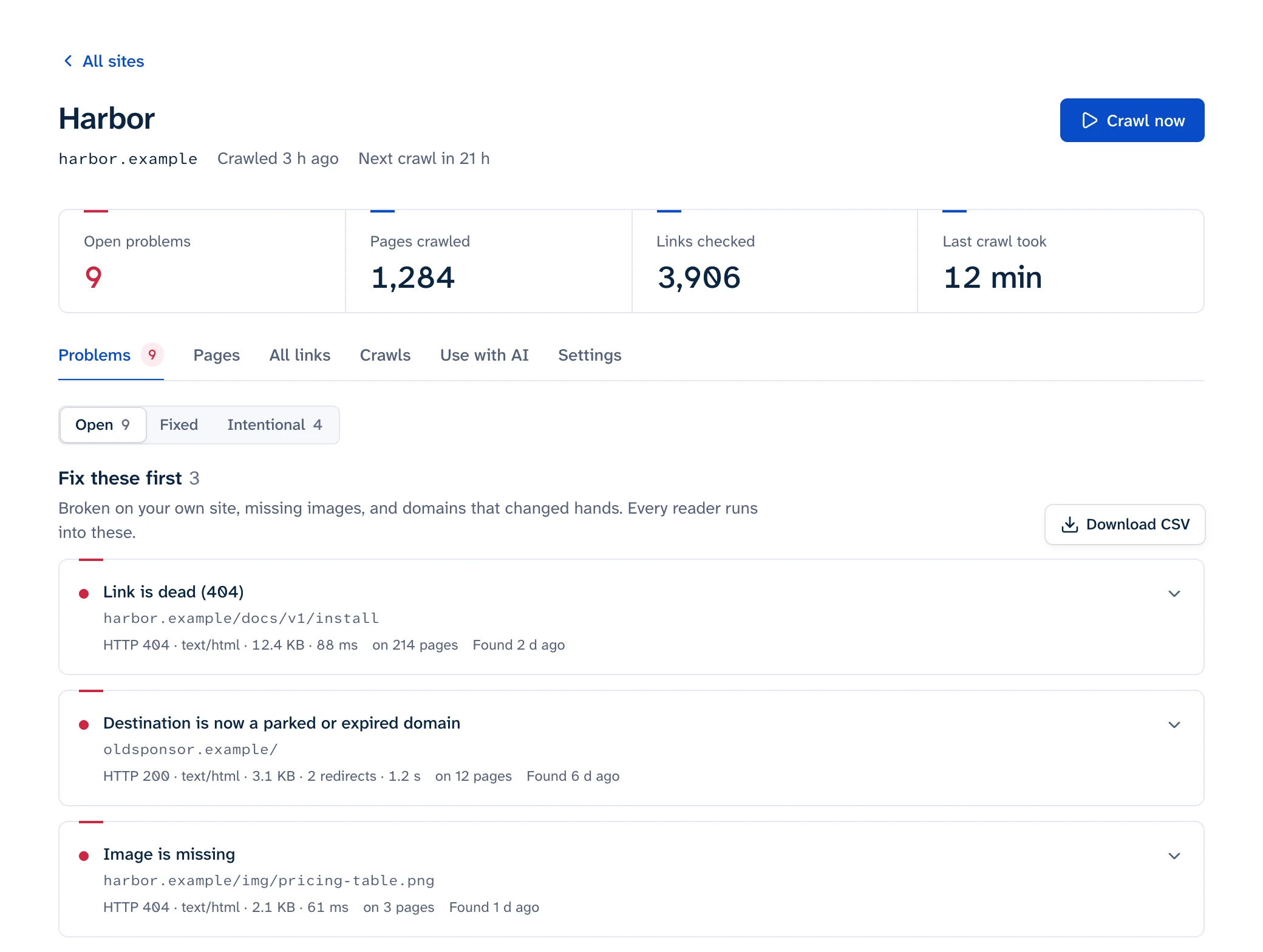
When a domain you link to expires, the link goes through two stages. First the domain stops resolving and the link fails like any dead link. Then someone else can register the name, and the same link starts leading to a parked page full of ads, a "domain for sale" banner or a scam, while answering 200 OK. To find links to expired domains, look for DNS failures and parked pages in your link checker's results, not only 404s. Remove or replace each one, and treat any script, stylesheet or iframe loaded from an expired domain as a security problem to fix the same day.
How a domain you link to changes hands
- The owner stops renewing it: the project ended, the company closed, the card on file expired.
- The domain expires. ICANN's rules require the registrar to interrupt the domain's DNS for at least the last eight days it can still be renewed, so the site stops resolving. When the registrar deletes it, registries for generic top-level domains like .com hold the name for a 30-day Redemption Grace Period with DNS still switched off, and the old owner can still get it back (ICANN Expired Registration Recovery Policy).
- The name is released and anyone can register it.
- The new owner points it at a parking service, a for-sale page or something worse. KrebsOnSecurity describes parked domains as "mostly expired or dormant domain names, or common misspellings of popular websites" (KrebsOnSecurity).
Your link checker sees that sequence as "host not found", followed by a 200 that looks like success. A checker that only flags 4xx and 5xx codes will report the link as fixed at the moment it becomes dangerous. In our study of Hacker News links, domains that no longer existed were the second most common way a link had died, after a plain 404.
Security scanners call the worst version of this broken link hijacking: a page that loads resources "from a non-resolving (potentially expired) domain", which an attacker can register to serve their own content (Acunetix).
Why a parked page is worse than a 404
A 404 wastes a reader's click. A parked page can send them somewhere harmful. Infoblox researchers found that "over 90% of the time, visitors to a parked domain would be directed to illegal content, scams, scareware" and similar pages; a 2014 study had put malicious redirects from parked domains at less than five percent (KrebsOnSecurity, December 2025).
The same research explains why you can't rely on spot-checking. Parked pages decide per visitor: Infoblox found they were benign for people arriving through a VPN "or else via a non-residential Internet address", and redirected visitors on home connections. Most link checkers run from a data center, so they see the harmless parking page. Your readers, on home broadband, may get the scam.
Dead domains are a big part of link rot. Of the 25% of sampled pages from 2013 to 2023 that Pew found gone, 9 percentage points were missing because "their entire root domain is no longer functional" (Pew Research, 2024). Each of those domains can be registered again.
Signs a link points to an expired or parked domain
- The host doesn't resolve.
dig +short example.comprints nothing, orhost example.comsaysNXDOMAIN. Act now, before someone registers it. - The nameservers belong to a parking or domain-sale service. Run
dig +short NS example.com. For example, Sedo's parking usesNS1.SEDOPARKING.COMandNS2.SEDOPARKING.COM(Sedo). - The page is a grid of "related searches" or ad links, or carries a "this domain may be for sale" message.
- The link redirects through several unrelated hosts before landing anywhere. Run it through the redirect checker to see each hop.
- The site is about something else entirely, in another language, or suddenly has certificate errors.
- The registration date is newer than your link. Look the domain up at ICANN Lookup: a creation date from last month on a link you added five years ago means the name lapsed and was registered again.
How to find them across your site
Run a crawl with external links turned on and read beyond the 404s. You're looking for DNS failures ("host not found", "could not resolve"), redirects that end on an unrelated domain, and pages that match the signs above. Some checkers detect parked pages for you; a plain status-code checker won't, because the page answers 200. Linkbruno reports parked or expired domains as their own finding and puts them in its "Fix these first" group, with every page that links to the domain.
Group the results by host rather than by page. An expired domain is often linked from several places at once: an old blogroll, a footer credit, a widget that was copied into every post.
Then check what your pages load, as well as what they link to. Scripts, stylesheets, fonts, iframes and hotlinked images are the dangerous ones. To list every outside host your theme or templates reference, with a count for each, search the source:
grep -rhoE '(src|href)="https?://[^/"]+' templates/ | sort | uniq -c | sort -rn
For a single page, open DevTools, go to the Network tab and sort by domain. Anything served from a host you don't recognize deserves a look. The page link checker does the links as well: it opens each one on the page and flags those that now land on a parking or for-sale page.
The free scan checks 25 pages of your site, including outbound links, without signing up.
What to do with each link
| What the link points to | What to do |
|---|---|
| An article or resource on the expired site | Search for its new home by title. If there isn't one, link a Wayback Machine copy from before the domain lapsed. Otherwise remove the link and keep the text |
| A company or product that no longer exists | Remove the link, keep the name as plain text |
| A hotlinked image | Host your own copy if the license allows, or remove it |
| A script, stylesheet, font or iframe | Remove it today, or replace it with a copy you host and have checked |
| Your own old domain | Renew it, and keep its redirects running |
Adding rel="nofollow" or rel="sponsored" to the link doesn't help. Those attributes talk to search engines, and your readers still land on the parked page. For the general fix workflow, including how to handle archived copies, see how to fix broken links.
Scripts from expired domains are urgent
A dead link sends readers away. A script from someone else's domain runs inside your page, with access to what's on it: forms, page content, payment fields. When that domain changes hands, the new owner decides what your site runs.
That has already happened. Cockpit, a free web marketing and analytics service, shut down in December 2014. Almost seven years later, in November 2021, criminals bought its old domain, and at least 40 e-commerce sites that still loaded Cockpit's script started serving a card skimmer to their customers (Sophos, Help Net Security).
Look for tags nobody remembers adding: analytics and A/B testing snippets from old tools, chat widgets, comment systems, share buttons, web fonts, and libraries loaded from a small CDN. For any third-party script you keep, add Subresource Integrity: an integrity hash on the <script> tag makes the browser "refuse to load the resource" if the file changes (MDN). That only works for files that never change, so it won't cover a script the vendor updates in place. For those, host a reviewed copy yourself or drop the script.
Keep your own old domains
If you've rebranded or moved, your old domain still has links pointing at it from other sites, old emails and printed material. Let it lapse and the next owner gets all of them, along with your old visitors. Keep renewing it, turn on auto-renew, make sure the registrar's contact email still reaches someone, and keep the redirects to your new site running. Google recommends keeping redirects after a move "for as long as possible, generally at least 1 year" (Google Search Central); for an old domain, the renewal fee is a cheap way to make that indefinite.
For the wider picture of how links decay, see link rot, and for the full process of finding problems across a site, the main guide to finding broken links.