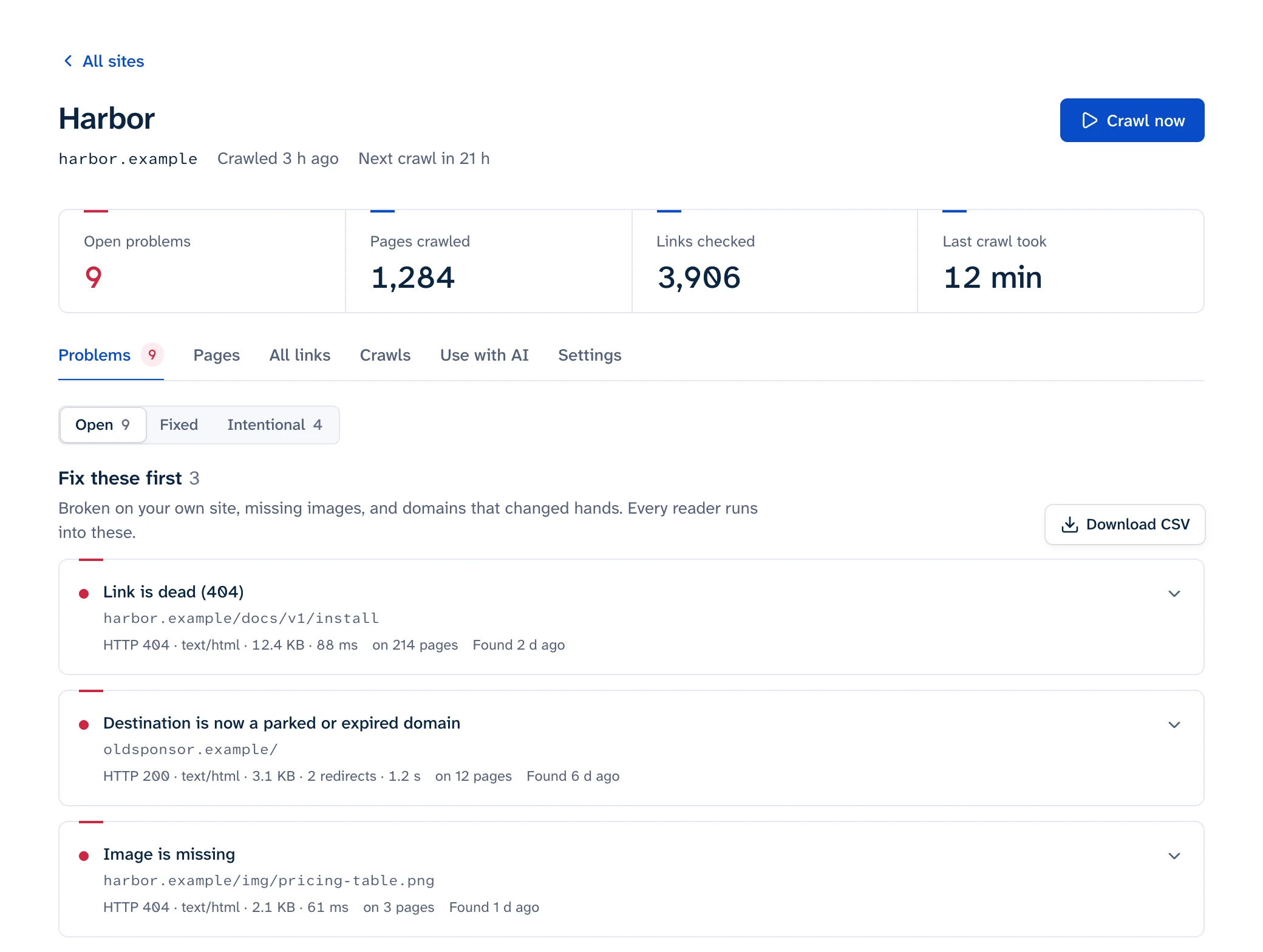
If you're weighing a Dr. Link Check alternative, the biggest practical difference is how often each plan re-checks your site. Dr. Link Check's free Lite plan only runs one-time checks, weekly checks start on its Professional plan and daily checks need Premium. Linkbruno checks weekly on its free plan and daily on every paid plan. Dr. Link Check is ahead on blacklist checks, PDF export and the range of files it checks, and the sections below say plainly where each tool wins.
Everything said here about Dr. Link Check comes from its pricing page, documentation, FAQ and check results reference, as of October 2026.
Dr. Link Check plans and limits
| Plan | Price | Websites | Links per website | Scheduled checks | Blacklist checks | Soft error checks | CSV and PDF export |
|---|---|---|---|---|---|---|---|
| Lite | $0 | 2 | 1,500 | None, one-time checks only | No | No | No |
| Standard | $13/month | 5 | 10,000 | Monthly, biweekly | Google Safe Browsing | No | No |
| Professional | $49/month | 10 | 50,000 | Adds weekly | Adds PhishTank | Yes | Yes |
| Premium | $159/month | 15 | 200,000 | Adds daily | Adds 2 more | Yes | Yes |
A few things the table doesn't show:
- The prices are at each plan's default link limit. Every paid plan has a slider that changes the limit and the price together, and yearly billing gives one month free.
- SSL certificate checks come with every paid plan, not with Lite.
- A link is "each unique HTML document, image, style sheet, script, or other resource referenced from your website", counted once however many pages use it. Their own reference points: a local law firm site with 200 pages is about 1,000 links, and an active five-year-old blog with 1,500 pages is about 7,500.
- One check runs at a time per account. Start another and it queues.
What each one checks
| Dr. Link Check | Linkbruno | |
|---|---|---|
| Where it finds links | <a>, <area>, <img>, <iframe>, <script>, <audio>, <video>, CSS @import and url(), Open Graph and Twitter Card tags, XML sitemaps |
<a>, <area>, images (src, srcset, <source srcset>), canonical and feed <link>s |
| JavaScript-built pages | Doesn't run JavaScript | Doesn't run JavaScript |
| Dead links, 5xx, DNS failures, timeouts | Yes | Yes |
| Soft 404s and parked domains | Professional and Premium: pages for sale, ad-only parked pages, placeholders, expired or suspended sites, error text on a 200 page | Soft 404s, parked and expired domains |
| Phishing and malware blacklists | Paid plans | No |
| Certificate problems on linked sites | Paid plans | Yes |
| Your own certificate nearing expiry | Not described in its docs | Warns at 14, 7, 3 and 1 days |
| Missing #section targets | Not described; its reports strip the #fragment from URLs |
Yes |
| Redirects | Breakdown by type (301, 302, meta refresh, JavaScript); more than 20 hops is an error | Redirects that end at an error, loops, long chains |
| robots.txt | Respected by default for Googlebot and * rules; can be ignored |
Respected by default; can be switched off |
| Crawl rate | Up to 4 parallel downloads per host, at most 8 requests a second; support can slow it | Paced per host |
Blocked links: both keep them apart
This is closer than most comparisons suggest. Dr. Link Check has a separate Blocked report for links "that could not be checked because requests from our servers were blocked", and it says that when its crawler gets a 429 "it doesn't consider the link to be broken, but instead marks it as blocked." Its docs list the usual signs: 403 from Akamai and Cloudflare, 429, Shopify's 430, 503 from Amazon and Cloudflare's "I'm Under Attack" page, and LinkedIn's 999. The FAQ adds that LinkedIn denies every request from the Amazon cloud, which is where Dr. Link Check's servers are.
Linkbruno makes the same split. LinkedIn 999, challenge pages from Cloudflare, Akamai, AWS WAF, Imperva and DataDome, and 429 rate limits are shown as "blocked, couldn't check", never as broken, and they never trigger an alert. Neither tool can tell you whether a blocked link works, so open those in a private window yourself. The 403 and 429 guide shows how to tell a bot wall from a real refusal.
Alerts and day-to-day use
The bigger differences show up once a check has been running for a few weeks:
| Dr. Link Check | Linkbruno | |
|---|---|---|
| Alerts | After each scheduled check, an email overview of that check's results to the addresses you list; an "Only send if issues were found" option skips clean runs | Email or Slack when something changes; no daily repeats |
| Re-checking after a fix | "Rerun Check" runs the whole project again | "Check again" re-reads only the pages that carry that one link |
| Silencing a link | A rule language under "Ignore links if…", e.g. Host = "example.com" |
"Mark as intentional" on one link; repeats (say, 130 links to one share-button host) fold into one row you accept at once |
| Finding the link on the page | Where it was found, plus a Source button showing the page's HTML with the link highlighted | Every page carrying it, which part of the page (navigation, header, footer, sidebar, main text), the href as written, the sentence around it, and a link that opens the live page with the link highlighted |
| Dead outbound links | Its 404 notes suggest trying the Wayback Machine | The Wayback Machine's last copy from before the link died, shown next to the problem |
Dr. Link Check's rule language is the more flexible of the two for silencing whole groups of URLs. The one-link re-check helps after a fix: you can confirm it straight away instead of waiting for the next full run.
Where Dr. Link Check is the better pick
- You want outbound links checked against phishing and malware blacklists. That starts on its Standard plan, and it's not something Linkbruno checks.
- You need a PDF report for a client or manager. Professional and Premium export PDF and CSV; ours is CSV only.
- You care about broken scripts, stylesheets, iframes, CSS backgrounds or social preview images. Dr. Link Check reads all of those, and it also checks that
mailto:domains have mail servers. - You have a big list of URLs to test. One project takes up to 10,000 start URLs and can check just those, with no crawl. Our bulk URL checker takes 100 at a time.
- Your site sits behind a login. Its crawler supports login forms, HTTP Basic, Digest and Bearer tokens, set up by their support for Professional and Premium customers.
- You want a bigger free one-off check. A check started from its home page covers up to 1,500 links with a temporary account; our free scan reads 25 pages.
- You value a long track record. The Wayback Machine has its home page from January 2012, describing the same broken and blacklisted link checks.
Where Linkbruno is the better pick
- You want scheduled checks without paying. The free plan crawls weekly; Lite never re-checks on its own.
- You want daily checks. Every paid plan crawls daily; on Dr. Link Check, daily checks are a Premium feature.
- You link to #sections, or you want a warning before your own certificate expires. Both are checked, plus
http://links onhttps://pages and links to pages your robots.txt blocks. - Your team lives in Slack, or you only want to hear about changes.
- You deploy through CI. An API token and a shell script check a preview deploy (up to 2,000 pages) and fail the job when it has broken links you haven't marked as intentional; see checking links in CI. Dr. Link Check's docs don't describe an API.
- You use AI tools. A private agent link and an MCP server give ChatGPT, Claude or Cursor the fix list.
- You want to see what wasn't checked. A Pages tab lists every page read and every page the crawler couldn't reach.
Switching from Dr. Link Check
- Export your current results. On Professional and Premium, use CSV export; on Lite and Standard export isn't available, so note the issues you're still working through.
- Copy your ignore rule from Project Settings, Advanced Settings, "Ignore links if…". You'll mark the same links as intentional after the first crawl.
- If you allowlisted Dr. Link Check's crawler IPs in Cloudflare, Wordfence or Sucuri, allow the new crawler the same way. The bot page has the user agent and steps.
- Run the first crawl and compare. The totals won't match: Dr. Link Check counts every unique resource, while our fix list counts problems and folds repeats into one row.
- Keep both for one cycle, then cancel under Account, Subscription Settings. Dr. Link Check says cancellations take effect at the end of the current term, so you keep access until then.
If you're still deciding how to check your site at all, start with how to find broken links on a website.